

Manage funnels
Funnels are the basis for funnel analysis on the Mini Program platform. By defining a sequence of events as steps, you can measure conversion rates and identify drop-off points in key user journeys.
This document describes how to manage funnels on the Mini Program platform, covering the full lifecycle from creation to deletion.
Create a funnel
To create a funnel, take the following steps:
- Log on to the Mini Program platform.
- In the left navigation panel, choose Analytics > Custom Analysis.
- On the displayed Custom Analysis page, find the desired mini program.
- Click Funnels in the Action column. The Manage Funnel tab is displayed.
- On the Manage Funnel tab, click New Funnel.
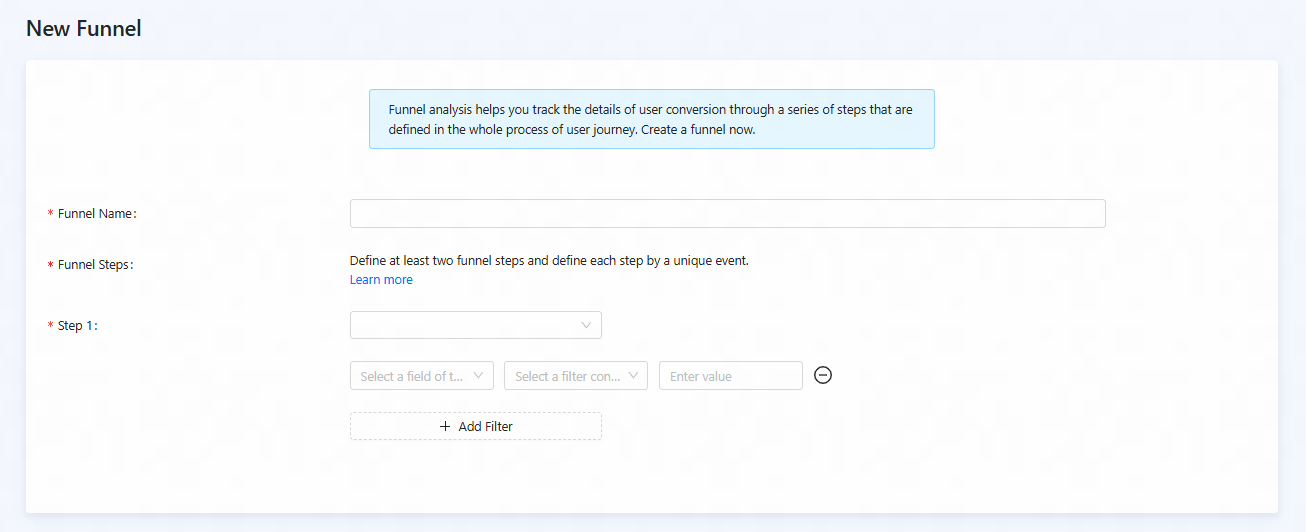
- On the New Funnel page, configure the parameters:
Parameter | Description |
Funnel Name | The name of the funnel. Follow a clear and consistent naming convention so analysts can easily recognize its purpose. |
Funnel Steps | Define the sequence of user actions that constitute the funnel. Define at least two funnel steps and define each step by a unique event.
Click Step to add subsequent steps to your funnel definition. |
- After the funnel is configured, click Save. This stores your funnel configuration, and it will be immediately available for analysis.
View funnels
After you create a funnel, you can view it in the funnel list on the Manage Funnel tab. To view funnels, take the following steps:
- Log on to the Mini Program platform.
- In the left navigation panel, choose Analytics > Custom Analysis.
- On the displayed Custom Analysis page, find the desired mini program.
- Click Funnels in the Action column.
- On the Manage Funnel tab, you can view the funnel list. The list displays key information about the funnels and the actions you can perform on them.

Figure 1. Funnel list
Modify a funnel
You can modify an existing funnel. To modify a funnel, take the following steps:
- Log on to the Mini Program platform.
- In the left navigation panel, choose Analytics > Custom Analysis.
- On the displayed Custom Analysis page, find the desired mini program.
- Click Funnels in the Action column.
- In the funnel list on the Manage Funnel tab, find the funnel you wish to modify and click Edit in its Action column.
- On the Edit Funnel page, modify the parameters based on your business requirements and click Save.

Figure 2. Modify a funnel
Delete a funnel
To delete a funnel that is no longer needed, take the following steps:
- Log on to the Mini Program platform.
- In the left navigation panel, choose Analytics > Custom Analysis.
- In the displayed Custom Analysis page, find the desired mini program.
- Click Funnels in the Action column.
- Find the funnel you want to delete and click Delete in its Action column.
- In the confirmation dialog that appears, click Delete.